Making a JILIKO GCash Deposit: Pick Speedy or QR Code, Then Check Two Limits

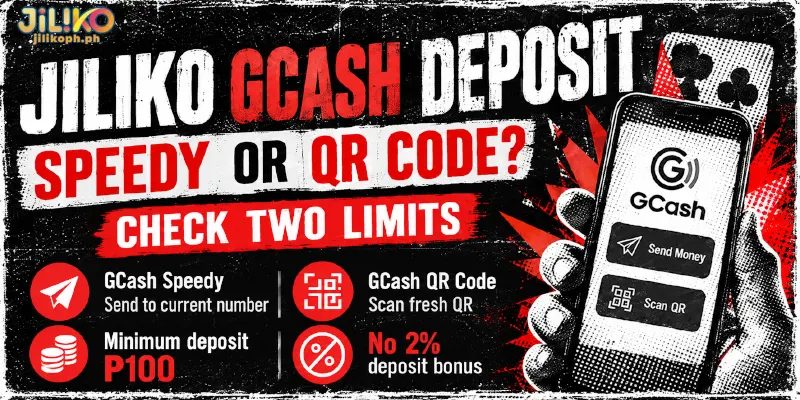
A JILIKO GCash deposit runs on one of two routes, GCash Speedy or GCash QR Code, and neither route earns the 2% bonus that Bank, GoTyme and USDT deposits carry. Each route has its own way of sending the money, but a large deposit can stop at either of two limits: the sub-channel (a payment lane inside each route) you pick or the limit on your own GCash wallet.
Which GCash Route Fits Your Deposit: Speedy or QR Code?
Neither route earns the 2% bonus, an extra 2% added to a qualifying deposit, so for a GCash deposit at JILIKO the choice between GCash Speedy and GCash QR Code is about how the money travels, not about what you earn. Because the minimum and the missing bonus are identical, price never separates the two routes.
The form’s own rule does, and each rule is a reason to start from the deposit form every time rather than from something kept from an earlier deposit. The table sorts the two routes by the minimum, the bonus and the one rule each route adds.
| Route | Usual minimum | 2% bonus | Rule the form adds |
|---|---|---|---|
| GCash Speedy | ₱100 | Not offered | The receiving number is not saved for next time |
| GCash QR Code | ₱100 | Not offered | The QR code is new for every deposit and is not saved |
How Do You Make a JILIKO GCash Deposit, Step by Step?
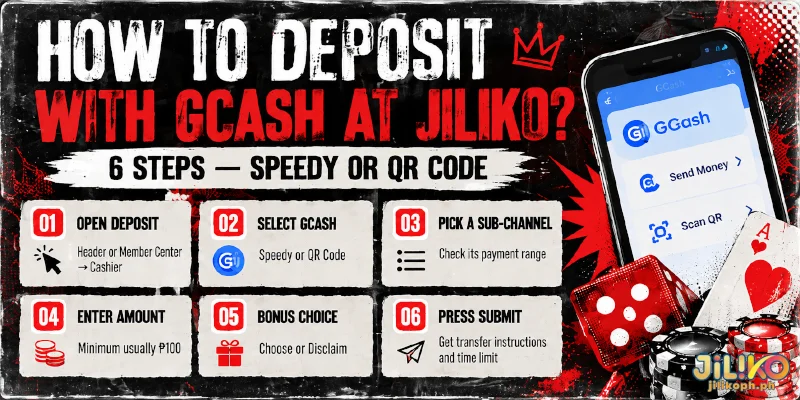
Open the GCash app first and check that the balance there covers the amount, because pressing Submit starts the time limit that the form sets for sending the money. Six steps then take you from the Deposit button to the transfer instructions, and the first five are the same on both routes.
- Click Deposit in the header, or reach the same form through Member Center, then Cashier, until the channel list appears.
- Choose GCash Speedy or GCash QR Code from the channel list, which brings up the sub-channels, the separate payment lanes under each route.
- Pick a sub-channel, a payment lane that sets a separate range, which may be narrower than the whole channel allows.
- Enter the amount, or tap a preset amount: 50, 100, 500, 1,000 or 5,000. The usual GCash minimum sits above the 50 button, so that button usually falls short.
- When the form asks whether you want to claim a bonus, choose one or keep the default, Disclaim, which deposits without a bonus. A first deposit is also the point where a welcome package gets chosen.
- Press Submit, which opens the transfer instructions for your route together with the time limit for sending the money. The instructions are where the two routes part, and each route has one rule to respect.
GCash Speedy: Do Not Keep the Receiving Number
Where a GCash Speedy sub-channel shows a phone number to send to, use that number for the deposit in front of you and nothing else. The form asks you not to save the number for later, so the next GCash Speedy deposit starts again from step 1 and picks up whatever number the form then shows.
GCash’s Help Center describes the ordinary route to a number: tap Send, select Express Send, enter the number and tap Next, tick the box after checking the details, then tap Send. Match the number and amount on that screen to the transfer instructions first, because the money goes to the number you typed.
GCash QR Code: Do Not Keep the Code
A JILIKO GCash QR Code deposit generates a new QR code each time and does not store the code. A code from an earlier deposit belongs to that earlier deposit, so scan only the code on screen and leave screenshots of old codes unused.
Paying a code follows the ordinary GCash scan route from its Help Center: tap QR in the GCash app, scan the code, check the payment details and tap Pay. GCash then sends an SMS confirming the payment, and that message is the sign that the transfer left your wallet.
JILIKO’s ₱50,000 Ceiling Is Not the Only Limit on a GCash Deposit
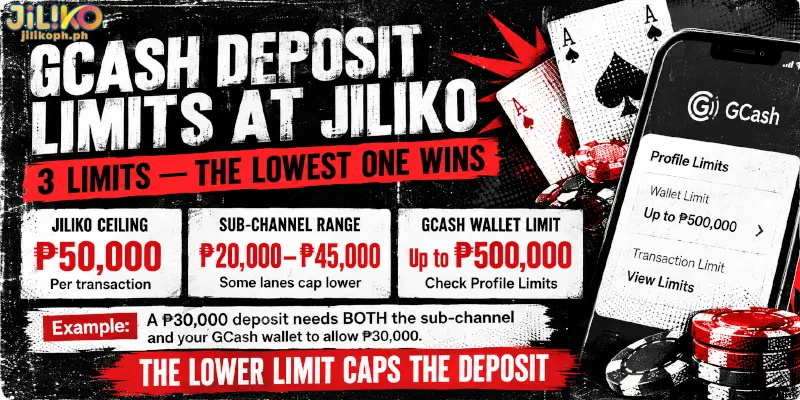
JILIKO accepts up to ₱50,000 per transaction, yet two narrower limits can stop a GCash deposit at JILIKO first. The list shows all three limits and where each one comes from.
- The JILIKO ceiling: ₱50,000 per transaction.
- The sub-channel range: set separately for each sub-channel, with some setting a ceiling anywhere from ₱20,000 to ₱45,000, so the range shown once you pick one is the range that binds.
- The GCash wallet limit: set by GCash and raised with verification.
GCash’s Help Center says an adult account that has completed full identity verification can raise the wallet limit to ₱500,000, and Profile, then Profile Limits in the GCash app shows your current figure. GCash updated its limits on 1 October 2026, so check the app instead of trusting an older number, and check it before you open the form.
As an illustration with made-up amounts, a ₱30,000 GCash deposit at JILIKO needs a sub-channel whose range reaches ₱30,000 and a GCash wallet that can hold ₱30,000, and the lower of those limits caps the deposit.
Because the lower limit wins, raising your GCash wallet limit does nothing for a deposit that the sub-channel already caps, and a wider sub-channel range does nothing if your wallet cannot hold the amount.
FAQ
The routes and the limits above leave three questions, and the first concerns when the money shows up.
Does a GCash Deposit at JILIKO Arrive Automatically?
Yes, a GCash deposit at JILIKO reaches your balance on its own once the transfer lands, and there is nothing to claim afterwards. When five minutes pass without the money arriving, customer service answers around the clock through live chat.
Can GCash Block a JILIKO Deposit Even When the Balance Is Enough?
Yes, through its outgoing limits. GCash’s Help Center lists ₱5,000 per month for Basic accounts, which hold at most ₱10,000, and ₱500,000 per month and per day for fully verified adults. A Basic account therefore stops a deposit long before the ₱50,000 ceiling.
Is a ₱100 Test Deposit a Good Way to Try a GCash Route?
Only if the ₱100 can serve as your first deposit, because the welcome packages apply to the first deposit only, from ₱100 up to ₱3,000. After that first deposit, ₱100 shows the sub-channel range and confirms the automatic credit, at the cost of one more round of the six steps.
One Wallet, Two Routes, and the Limit That Bites First
Both routes lead from the same deposit form to the same GCash wallet, so the choice that lasts at a GCash deposit at JILIKO is the amount. Check the amount against the sub-channel range and your GCash profile limit before you press Submit, and weigh that GCash earns no 2%, which Bank, GoTyme and USDT add on qualifying deposits.