
Depositing With Maya at JILIKO: ₱50 Is the Floor, and Your Maya Account Sets the Ceiling

A JILIKO Maya deposit can start at ₱50, yet the first amount you pick decides more than the minimum itself does. A ₱50 deposit sits below the range that the welcome bonus accepts, and a ₱50,000 deposit can stop at a limit that your Maya account sets. Maya at JILIKO runs into three ceilings, and only your Maya account level is yours to raise.
Making a JILIKO Maya Deposit From the Header to Submit
Keep enough balance in your wallet before you start with Maya at JILIKO, because the transfer has a time limit. Five steps lead from the header button to the transfer screen, and the choice that counts comes in step 3.
- Press Deposit in the header, or, from inside Member Center, go through Cashier and then Deposit.
- Choose the Maya wallet from the channel list, where the wallet appears under an older name. The channel then opens a list of sub-channels, which are payment lanes inside the channel, each with a separate range.
- Pick a sub-channel, and read the range before you type anything. The minimum deposit is ₱50 on some sub-channels and usually ₱100, and some ceilings sit between ₱20,000 and ₱45,000.
- Type the amount, or tap a preset button; the row runs from 50 at the low end to 5,000 at the high end.
- At the bonus prompt, pick a bonus or keep Disclaim, the default, which deposits with no bonus. Then press Submit.
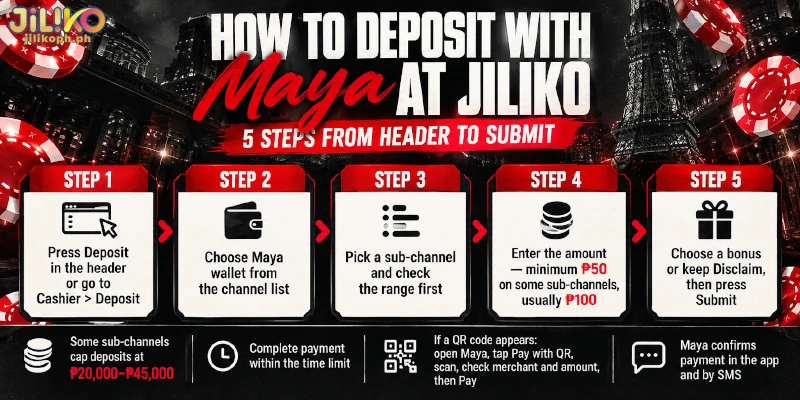
After Submit on Maya at JILIKO, you send the money within the time limit. Where the transfer screen shows a QR code, Maya’s own guide describes the payment: tap Pay with QR on the Maya home screen, scan the code, check the merchant name and the amount, then press Send Payment or Pay.
Maya confirms the payment in the app and by SMS, so you know the money has left your wallet. Where the screen shows something other than a QR code, follow the instructions on screen, because a JILIKO Maya deposit rests on the transfer arriving within that time limit.
Once the transfer lands, JILIKO credits the deposit automatically. If your balance has not moved within 5 minutes, write to customer service, which answers 24/7 through Live Chat, and keep the Maya payment confirmation ready as proof.
What a ₱50 Deposit on Maya at JILIKO Reaches and Misses
The lowest amount on Maya at JILIKO is ₱50, and that figure sits below the ₱100 floor of the welcome bonus, so the amount you type decides which bonus range a first deposit can reach. The table reads the amounts from the lowest upward.
| Amount | What the amount reaches | What the amount skips |
|---|---|---|
| ₱50 | The lowest minimum, offered on some Maya sub-channels only | The welcome bonus range, which starts at ₱100 |
| ₱100 | The usual Maya minimum and the lowest deposit the welcome bonus takes | The extra 2% deposit bonus that Bank, GoTyme and USDT carry |
| ₱3,000 | The top of the welcome bonus range | A bigger first deposit falls outside that range |
| ₱20,000 to ₱45,000 | The ceiling that some sub-channels set | Any larger amount on those sub-channels |
| ₱50,000 | The ceiling for one transaction | Anything above, which needs a second deposit |
Taken together, the table shows why the minimum is not the number to plan around. Maya at JILIKO does not earn the 2% deposit bonus that other channels carry, so ₱50 saves little and misses the welcome range, while the usual start of ₱100 costs only ₱50 more.
For example, a first deposit of ₱80 clears the ₱50 minimum on a sub-channel with that minimum, yet earns no welcome bonus, while ₱100 on the same sub-channel falls inside the range.
Plan a first deposit to fall inside the welcome range, which means starting at ₱100, and keep the ₱50 minimum for a later top-up.
What Your Maya Account Level Allows
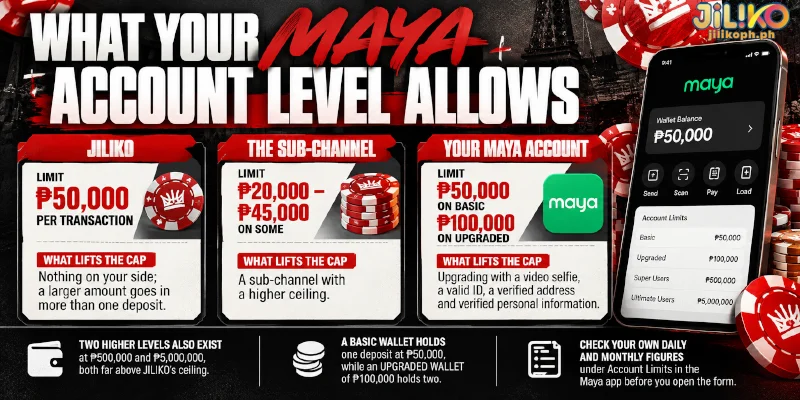
Your Maya account level sets how much the e-wallet holds, and on a Basic account that figure, ₱50,000, equals the per-transaction ceiling. The table separates the three places where Maya at JILIKO can be capped by who sets each limit and what lifts the cap.
| Who sets the limit | Limit | What lifts the cap |
|---|---|---|
| JILIKO | ₱50,000 per transaction | Nothing on your side; a larger amount goes in more than one deposit |
| The sub-channel | ₱20,000 to ₱45,000 on some | A sub-channel with a higher ceiling |
| Your Maya account | Wallet limit of ₱50,000 on Basic, ₱100,000 on Upgraded | Upgrading with a video selfie, a valid ID, a verified address and verified personal information |
Two higher levels exist as well, at ₱500,000 and ₱5,000,000, and both sit far above the ceiling that Maya at JILIKO applies. As an illustration, a Basic wallet holds one deposit at ₱50,000, while an Upgraded wallet of ₱100,000 holds two.
Your own daily and monthly figures appear under Account Limits, which you reach from the profile button at the upper left of the Maya app, so check them before you open the JILIKO Maya form. When you upgrade, Maya raises what the wallet can hold, not what a sub-channel accepts, so the lower of the two still caps the deposit.
FAQ
The ladder above names the limits, so the questions below cover what a Basic account can send and where larger transfers stop.
Is the Wallet Under the Older Name the Same Maya Wallet?
Yes, since the wallet was renamed Maya in 2022, a JILIKO PayMaya deposit is a Maya deposit made from the same app, and the sub-channels, limits and steps above apply unchanged.
Can a Basic Maya Account Pay for a JILIKO Maya Deposit?
It depends on the transfer screen. Maya’s account limits page lists a ₱50,000 daily purchase limit for Basic accounts and marks Send Money and bank transfers as unavailable there. A QR code is paid through Pay with QR, but a number or an account to send to needs one of those two, so the Upgraded level matters then.
How Much Can an Upgraded Maya Account Send in One Go?
Maya lists ₱20,000 per Send Money transaction and ₱100,000 per day for Upgraded accounts, and ₱50,000 per day for bank transfers through InstaPay. A transfer above ₱20,000 therefore cannot leave as one Send Money payment, so keep a JILIKO Maya deposit inside what your own account sends in one go, whatever range the sub-channel shows.
The Amount You Choose Settles Both the Bonus and the Limit
A deposit on Maya at JILIKO comes down to two decisions made with one number: whether a first deposit lands inside the welcome range, and which limit stops a large one. Settle the bonus choice first, because the welcome range sets the floor at ₱100, and then confirm that your Maya account level covers the amount you typed.