Download the JILIKO App for Android and iPhone: Start From the Download Page

You start a JILIKO app download at the DOWNLOAD APP button on the left of jilikoph.ph, and the Download page offers one route for Android and one for iPhone. The ₱88 Download App 88 bonus needs more than the install: Level 2 verification (name and birth date), a ₱300 deposit within the month and a 5x wagering requirement, the betting the bonus must clear first.
Start From the DOWNLOAD APP Button on the Left
The DOWNLOAD APP button opens the Download page, and every attempt to download the JILIKO app starts there. The page shows two options, one for Android and one for iPhone, so the phone in your hand makes the first choice for you.
Download the JILIKO app from that page and from nowhere else. Apps in Google Play and the App Store pass that store’s review before they reach a phone, while a file from a website passes no such review.
A look-alike site can hand you any file, so before you press anything, check that the address bar reads jilikoph.ph.
You are on the right page when two routes appear: a file download for Android and, for iPhone, a QR code labelled Scan Me.
Two Routes for the JILIKO App Download, One for Each Device
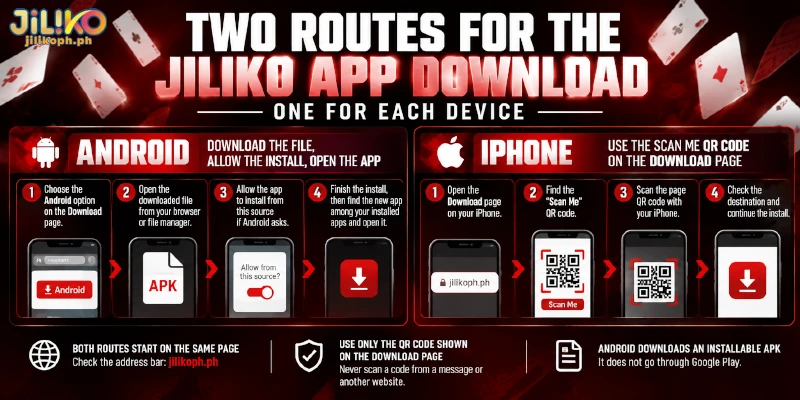
On Android the Download page hands over a file, and on iPhone a QR code, so each device gets its own sequence to download the JILIKO app, shorter route first. Both routes start on the same page, which makes the address bar the one check that covers either install.
iPhone: Use the Scan Me QR Code on the Download Page
For the JILIKO iOS app, the Download page offers a QR code labelled Scan Me, and the install starts from that code rather than from a file. A QR code hides where the scan will lead until the scan happens, so scan only the code shown on the Download page, never one forwarded in a message or posted somewhere else.
iPhones normally install apps only through the App Store, so a route outside the store, such as a QR code on a website, deserves extra care about where the code comes from.
Android: Download the File, Allow the Install, Open the App
For a JILIKO app download for Android, the Download page gives you the JILIKO APK, an installable file that downloads straight from the site without going through Google Play. You move the file from the page to your phone in four steps:
- On the Download page, choose the Android option so the file downloads from the site.
- Open the downloaded file from your browser’s download list or from your file manager.
- If Android asks permission to install from this source, allow the app you used for the download, either the browser or the file manager.
- Finish the install, then find the new app among your installed apps and open the app.
Android asks for that permission because an app outside Google Play counts as coming from an unknown source, since no store has vetted the file. The permission belongs to the browser or file manager, not to the downloaded file, so the permission stays on for any other file that app opens until you switch the setting off.
Once Installed, the App Offers the Website’s Features and Scan Login
Once you download the JILIKO app, the same features as the website are available there, and Scan Login, the QR sign-in offered on the web login screen, is one of them. Scan Login sits beside the password and Google routes as a third way to sign in.
Because both device routes lead to the same features, the phone you choose changes only how the app gets installed, not what you can do after signing in.
Download App 88: ₱88 After Level 2 Verification, a ₱300 Deposit and a 5x Wagering Requirement
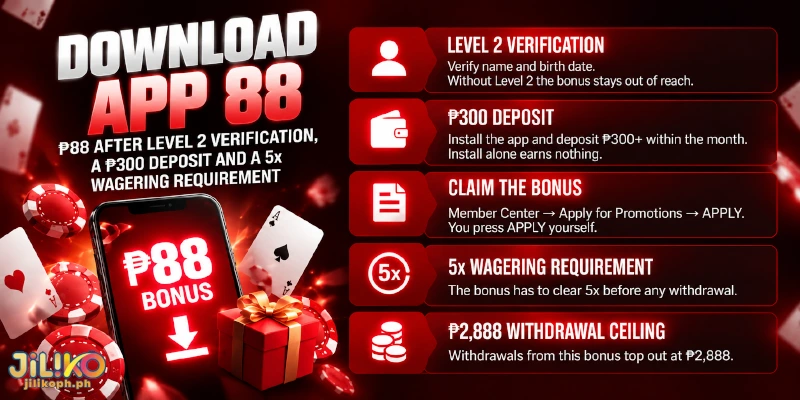
Download App 88 pays ₱88 when the conditions below are met, and the table sorts them by what you do first and what limits the payout.
| Condition | What it asks | What it means for you |
|---|---|---|
| Account level | Level 2 verification, which needs your name and birth date | Without Level 2 the bonus stays out of reach, whatever you deposit |
| Install and deposit | The app installed and a deposit of ₱300 or more within the month | The install alone earns nothing, so the deposit is the second half of the trigger |
| Claim | Member Center, then Apply for Promotions, then APPLY | You press APPLY yourself; nothing arrives by installing |
| Wagering requirement | 5x | The bonus has to clear 5x before any withdrawal |
| Withdrawal ceiling | ₱2,888 | Withdrawals from this bonus top out at ₱2,888 |
While a bonus is running, a withdrawal waits on the bonus’s own wagering requirement, so claiming Download App 88 puts the 5x requirement in front of your next withdrawal. Deposits themselves carry no wagering requirement, which is why the requirement belongs to the bonus and not to the ₱300.
Because the requirement and the ₱2,888 ceiling both attach to the bonus rather than to your deposit, leaving the bonus unclaimed is the only way to keep the whole balance free of the 5x requirement.
FAQ
The sections above cover installing and claiming, so the questions below cover what stays on your phone and what stays on your account.
Can I Claim Download App 88 More Than Once?
No, Download App 88 allows one claim per person. Accounts that share an IP address, mobile number, device or ID count as one player, so a second account on the same phone does not open a second claim.
How Do I Switch Off the Install Permission After the JILIKO App Is Installed?
Open your Android settings, find Install unknown apps, whose exact path differs from one phone to another, select the browser or file manager you used for the download, and turn the permission off. The installed app keeps working, because the permission matters only while a file is being installed.
Does Deleting the JILIKO App Remove My Balance or Bonus?
No. Your balance sits in Main Wallet on the account, and the website opens the same account as the app, so deleting the app changes only how you reach it. A running bonus belongs to the account too, which means a fresh JILIKO app download does not restart a bonus and does not open a second Download App 88 claim.
Only the Download Page Counts as the Source, and the Install Alone Opens No Bonus
A JILIKO app download is only as sound as the page the file came from, which is why the Android file and the iPhone QR code both belong to the Download page. The install alone opens nothing extra: the bonus waits on a verification, a deposit and a requirement that stay yours to meet.