

JILIKO Register Takes One Popup, and Two Entries Stay Fixed

JILIKO register runs through a single popup, and two entries on the form, your username and your mobile number, stay fixed once the account exists. Support alone can change them afterward, so type those two entries slowly. A name and birth date added later move the account to Level 2, the tier that opens perks such as Download App 88 and Share FB 58.
Four Things to Have Ready, Two of Which Lock After Sign-Up
Four items need to be ready before you register at JILIKO, and two of them lock after sign-up: your mobile number and your username. The table sorts the four by what goes wrong when you get them wrong.
| Have ready | What the form needs | Cost of a mistake |
|---|---|---|
| A mobile number you will keep | Typed in the Mobile Number field, and used again on the Forgot Password popup to verify you | The number locks once you register at JILIKO, and registration details change only through support |
| A username | At least 5 characters | The username locks after sign-up, and support is the only route to a change |
| Your name and birth date | Typed later in Personal Information, for Level 2 | Level 2 stays closed until First Name, Last Name and Birthday are all filled |
| A device and connection with no other account on them | One account per person | A matching IP address, phone number, device, ID or bank account counts as one player, and the bonus terms list that as grounds for losing a bonus |
Your mobile number also feeds the Forgot Password popup, which verifies you through that number. Choose one you will still hold in a year, because a reset asks for the number you registered and only support can swap the number.
Register at JILIKO by Filling the Popup From Top to Bottom
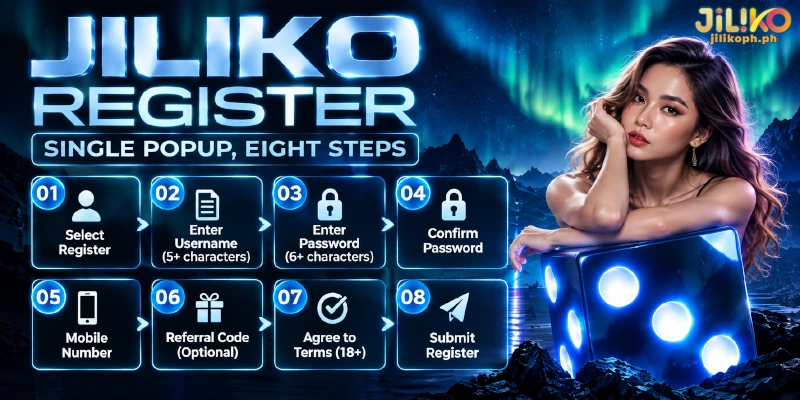
With those four items settled, you create a JILIKO account by selecting Register, and the popup titled Free Registration opens with five entries and one tick. The same popup also offers Continue With Google as an alternative to typing the fields below.
- Select Register. The popup titled Free Registration opens.
- Type a Username of at least 5 characters. This entry locks once you register at JILIKO, so choose the name you want to keep.
- Type a Password of at least 6 characters that you have not used on another site.
- Retype the same password in Confirm Password.
- Type your Mobile Number, the one you settled on in the table above.
- Type a Referral Code only if a friend gave you one. The field is marked Optional and can stay empty.
- Tick the box that agrees to the Terms & Conditions. Those terms set the minimum age for members at 18.
- Select Register again to submit your JILIKO registration. Your username and password then work on the Log In popup.
Verification to Level 2 Takes a Name and a Birth Date
Right after you register at JILIKO, the account sits below Level 2 until you verify the account. Level 2 opens when you verify your JILIKO account by filling First Name, Last Name and Birthday in Personal Information, the three fields marked as required. That step is identity verification (KYC), which ties a real name and birth date to the account.
The three fields sit in Personal Information, two levels below Member Center, so you reach them in four steps:
- Open Member Center.
- Select Profile.
- Open Personal Information.
- Fill First Name, Last Name and Birthday.
Type First Name, Last Name and Birthday exactly as they appear on your ID. The Terms & Conditions allow a request for an ID, passport or driver’s license, with the account locked until that check is finished, so a name typed loosely can be compared against a document later.
You enter only text at Level 2, which can feel like a formality, yet the document request in the same terms turns that text into a claim you may have to back up.
Four Perks That Need Level 2 Plus One Extra Condition
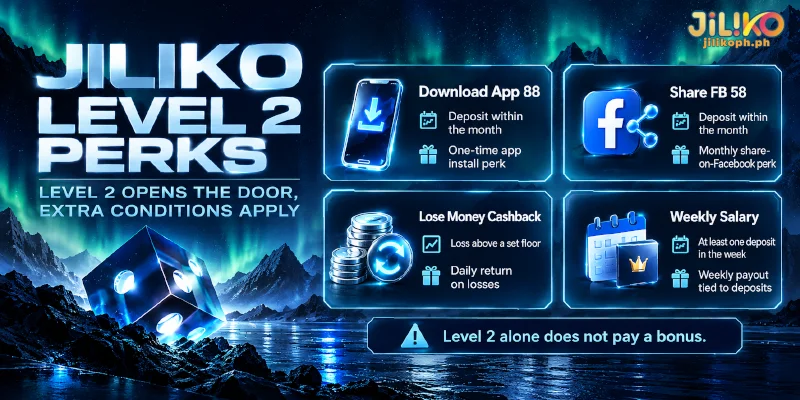
Once you register at JILIKO and reach Level 2, four promotions become available, and each adds a separate condition on top. The welcome bonus sits outside these four: new members choose the bonus on the deposit form with a first deposit. The table names the extra condition for each perk and the kind of perk each one is.
| Perk | Needs besides Level 2 | Kind of perk |
|---|---|---|
| Download App 88 | A deposit within the month | A one-time perk for installing the app |
| Share FB 58 | A deposit within the month | A monthly perk for sharing a post on Facebook |
| Lose Money Cashback | A loss above a set floor | A daily return on losses |
| Weekly Salary | At least one deposit in the week | A weekly payout tied to deposits |
Because each perk asks for a separate deposit or loss, Level 2 opens the door but pays nothing by itself, and the terms of each promotion set the amounts.
FAQ
The questions below cover three things the form and the steps above leave open.
Do I Need an Email Address to Sign Up at JILIKO?
No. The JILIKO registration popup has no email field, and E-mail appears later in Personal Information as an optional entry, next to Viber Id and Whatsapp Id.
Do I Need to Deposit to Register at JILIKO?
No. JILIKO registration is free: the popup is titled Free Registration, and the entries ask only for a username, a password with a confirmation, a mobile number and an optional Referral Code. A deposit comes up later, when you claim a promotion that asks for one.
How Long Can an Account Go Without a Login?
An account you register at JILIKO turns inactive after 12 months without a login. Sign in at least once a year to keep the account in use.
Why Two Fields Deserve Slow Typing
Your username, at least 5 characters long, and your Mobile Number are the two entries that only support can change later, so a few seconds of care on them decide whether you ever need support after you register at JILIKO. Only those two are locked in Personal Information, and Level 2 waits until you choose to verify.